Who this is for: Developers who have created at least one Claude Code agent and want to connect multiple agents into a coordinated team. If you're new to agents, start with What Are Claude Code Agents? first.
What you'll need:
- Claude Code installed and working — see Getting Started if you need setup help
- Familiarity with agent basics (model, tools, permissionMode) — see What Are Agents? if you're new
A single agent is useful. A team of agents that coordinate is powerful. Multi-agent orchestration lets one agent delegate tasks to specialists — a product manager breaks down features, hands implementation to a developer, and sends the result to a reviewer.
This post explains how delegation works, common patterns, and how to design your own agent team.
How agents delegate
Claude Code delegates tasks to agents automatically. When you create agent files in .claude/agents/, Claude reads each agent's description field and routes matching tasks to the right specialist.
Here's how it works in practice:
- You ask Claude to plan and implement a feature
- The main session matches the planning work to the PM agent based on its description
- The PM breaks it into tasks and returns a plan to the main session
- The main session delegates "implement login form" to the developer agent
- The developer implements it and returns the result
- The main session delegates review to the reviewer agent
- The reviewer checks it and reports back
The PM never writes code. The developer never plans. Each agent stays in its lane.
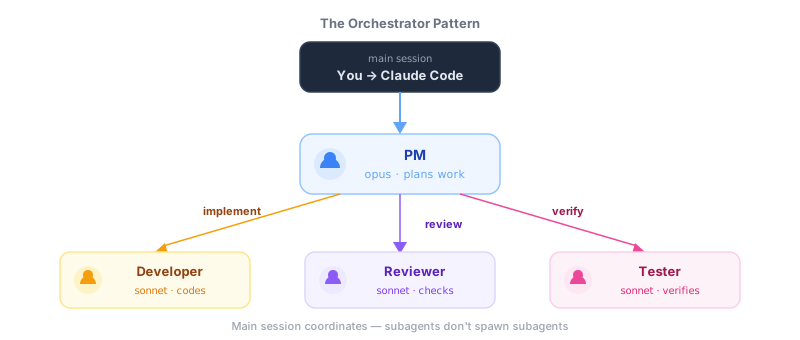
Important: Subagents cannot spawn other subagents. The delegation chain is always: you → main session → subagent. The main session acts as the coordinator — it reads each agent's plan or output and decides which agent to call next. From your perspective this feels seamless, but the main session is always the one orchestrating.
The orchestrator pattern
The most common multi-agent setup is the orchestrator pattern: one lead agent coordinates specialists.
PM (orchestrator)
  ├── Developer (implements)
  ├── Reviewer (checks quality)
  └── Tester (verifies behavior)
The orchestrator needs:
model: opus— complex reasoning for planning and coordination- A clear
descriptionthat tells Claude when to use this agent - Don't list
tools— agents inherit all tools by default. Only addtoolsif you want to restrict what the agent can do
Specialists need:
model: sonnet— balanced speed and quality for execution- Restricted tools for safety (e.g., a reviewer shouldn't have Edit or Write)
- Clear instructions about their scope
Setting up delegation
The orchestrator agent inherits all tools by default — including the ability to delegate. Just give it a good description and instructions:
---
name: product-manager
description: >-
  Feature planning orchestrator who breaks requests
  into tasks and delegates to specialists.
model: opus
---

# Product Manager

You plan features and delegate to specialist agents.

## Delegation Rules
1. Break features into tasks of 1-2 files each
2. Delegate implementation to the developer agent
3. Delegate reviews to the reviewer agent
4. Never implement code yourself
Specialist agents should have restricted tools — only what they need for their job:
---
name: developer
description: Implements features with TypeScript and SOLID principles.
model: sonnet
tools:
  - Read
  - Edit
  - Write
  - Bash
  - Grep
  - Glob
permissionMode: acceptEdits
---

# Developer

You implement features assigned to you.

## Rules
- Follow existing code patterns
- Run the linter after changes
- Report what you changed and why
Common orchestration patterns
Chain pattern
Tasks flow through agents in sequence, coordinated by the main session:
Main session → PM → Main session → Developer → Main session → Reviewer → Main session → TesterThe main session delegates to each agent in turn and passes relevant context forward. Good for standard development workflows.
Fan-out pattern
The main session delegates to multiple agents for independent tasks:
Main session → Developer A (frontend)
             → Developer B (backend)
             → Designer (UX review)
Good for tasks with independent components. Note: this works from the main session — subagents can't spawn other subagents, so describe the full fan-out in your prompt or skill.
Auto-fix loop
An agent runs checks, fixes issues, and re-checks:
Tester → finds failures → Developer → fixes → Tester → verifiesThe orchestrator manages the loop, capping at 2-3 iterations to prevent infinite cycles.
Designing your agent team
Start small
Don't create 10 agents on day one. Start with two:
- A developer that implements
- A reviewer that checks
Add a PM orchestrator when you need coordinated multi-step workflows. Add specialists (tester, UX, security) when you have real needs for them.
Match models to roles
| Role | Model | Why |
|---|---|---|
| Orchestrator (PM) | opus | Needs complex reasoning to plan and delegate |
| Developer | sonnet | Good balance of speed and code quality |
| Reviewer | sonnet | Needs to understand code deeply |
| Researcher | haiku | Simple lookups, fast results |
Keep instructions focused
Each agent should know only what it needs. A developer doesn't need the PM's prioritization framework. A reviewer doesn't need coding patterns. Focused instructions produce better results.
Test one agent at a time
Before orchestrating a team, make sure each agent works well solo. Run the developer agent on a feature. Run the reviewer on a PR. Fix their instructions before connecting them.
A real example: feature implementation
Here's how a 3-agent team handles "Add a dark mode toggle":
Step 1: PM plans
- Identifies files to change (theme context, header component, tailwind config)
- Breaks into 3 tasks
- Delegates task 1 to developer
Step 2: Developer implements
- Creates theme context with localStorage persistence
- Adds toggle button to header
- Updates Tailwind config for dark classes
- Reports back to PM
Step 3: PM delegates review
- Sends changed files to reviewer
- Reviewer checks for accessibility, edge cases, security
- Reports: "Warning: no fallback for SSR, toggle needs aria-label"
Step 4: PM delegates fixes
- Developer adds SSR fallback and aria-label
- PM runs one final review pass
- Done
Each agent did exactly its part — planning, implementing, reviewing, and fixing.
Next steps
- Start with a pre-built team: The Startup Dev Team has 4 agents already configured to work together — free
- Scale up: The Enterprise Dev Team adds advanced reviewers, UX designers, and more skills
- Read the practical guide: From Solo to Team walks through upgrading from a single Claude session to a full agent team