Who this is for: Developers who have used Claude Code a few times but haven't created custom agents yet. No prior orchestration experience needed.
What you'll need:
- Claude Code installed and working — if you haven't done this yet, follow Getting Started with Claude Code first
- Any folder to try it in — even a fresh
mkdir my-projectworks
If you've been using Claude Code as a single assistant, you're missing some of its most powerful features. Agents let you split that one assistant into a team of specialists — each with its own role, tools, and rules.
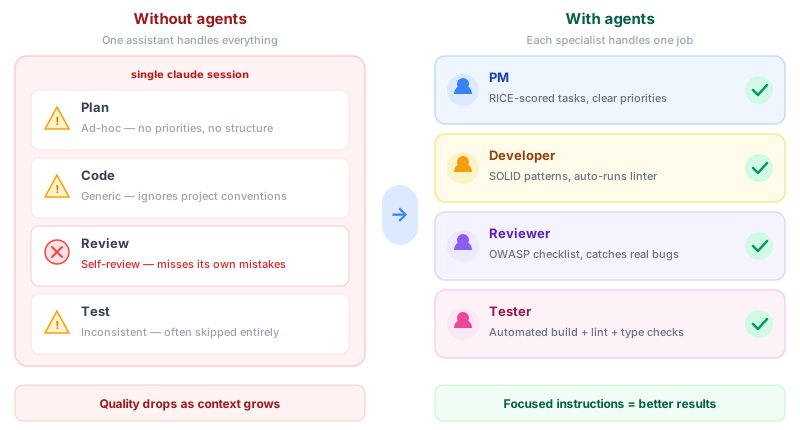
This post explains what agents are, why they're useful, and how to create one.
What is an agent?
An agent is a markdown file you drop into .claude/agents/ in your project. It tells Claude to adopt a specific persona when invoked — like a product manager who plans features, or a developer who writes code.
Each agent has two parts:
- YAML frontmatter at the top — configuration (model, tools, permissions)
- Markdown body below — instructions and constraints
Here's a minimal example:
---
name: developer
description: Implements features with clean TypeScript code.
model: sonnet
tools:
  - Read
  - Edit
  - Write
  - Bash
permissionMode: acceptEdits
---

# Developer

You implement features for this project.

## Rules
- Follow existing code patterns
- Run the linter after every change
Save this as .claude/agents/developer.md, and Claude Code will use it whenever the task matches the agent's description.
Why not just use one assistant?
A single prompt can't hold every instruction for every task. When you ask one assistant to plan, code, review, and test, instructions compete and quality drops.
With agents, each specialist has focused instructions. A reviewer doesn't need coding rules. A developer doesn't need UX heuristics. Separation makes each agent better at its job.
The three things every agent needs
1. A clear description
The description field is how Claude decides which agent to route a task to. Make it specific:
- Vague: "Helps with code" (everything "helps with code")
- Specific: "Implements features with TypeScript following SOLID principles"
2. The right tools
Don't give every agent every tool. A product manager that only plans shouldn't have Bash access. A code reviewer doesn't need Write. Least-privilege makes agents safer and more focused.
3. Actionable instructions
The markdown body is the agent's system prompt. Generic instructions produce generic results. Include:
- Numbered responsibilities
- Domain frameworks (SOLID, OWASP, WCAG)
- Hard rules the agent must follow
- Anti-patterns to avoid
Your first agent in 60 seconds
- Create the folder:
mkdir -p .claude/agents - Create a file:
.claude/agents/reviewer.md - Paste this content:
---
name: reviewer
description: Reviews code for bugs, security issues, and style violations.
model: sonnet
tools:
  - Read
  - Grep
  - Glob
permissionMode: plan
---

# Code Reviewer

You review code changes for quality and correctness.

## Checklist
1. Check for security issues (injection, XSS, hardcoded secrets)
2. Verify error handling on all external calls
3. Flag any functions longer than 50 lines
4. Confirm naming follows project conventions

## Rules
- Never modify code yourself — only suggest changes
- Use severity tags: Blocking, Warning, Nit
That's it. Next time you ask Claude Code to review something, it should pick up this agent based on its description.
What model should I pick?
| Model | Best for | Speed |
|---|---|---|
opus | Planning, architecture, complex reasoning | Slowest |
sonnet | Implementation, code generation, reviews | Balanced |
haiku | Quick lookups, simple checks, research | Fastest |
Start with sonnet for most agents. Use opus for agents that orchestrate other agents (like a product manager). Use haiku for agents that just gather information.
Next steps
- Add more agents: A product manager, a tester, a UX reviewer — each as a separate
.mdfile - Learn skills: Agents become more powerful when paired with skills (slash commands that trigger specific workflows)
- Try a pre-built team: The Startup Dev Team template gives you 4 agents and 5 skills, free — ready to drop into any project