Who this is for: Developers who know the basics of Claude Code and want to create reusable slash commands. Reading What Are Claude Code Agents? first helps but isn't required.
What you'll need:
- Claude Code installed and working — see Getting Started if you need setup help
- Any folder to try it in — the examples use npm, but skills work with any language or setup
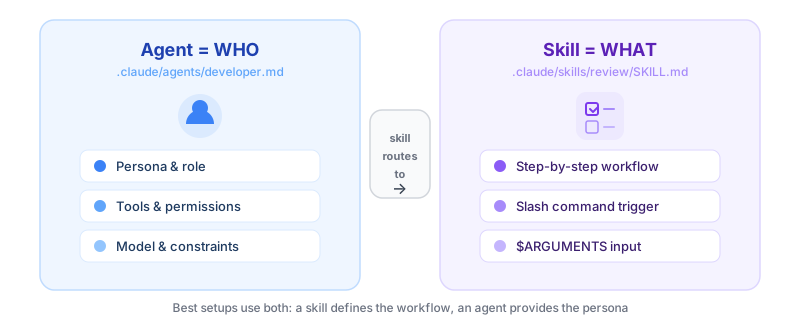
Agents give Claude Code a persona. Skills give it a playbook. A skill is a slash command — like /test or /deploy — that triggers a specific workflow with predefined steps.
If you find yourself typing the same instructions over and over, that's a skill waiting to be created.
What is a skill?
A skill is a SKILL.md file inside .claude/skills/<skill-name>/. When you type /<skill-name> in Claude Code, it reads that file and follows the instructions.
Here's the structure:
.claude/
  skills/
    test/
      SKILL.md
    deploy/
      SKILL.md
Each SKILL.md has YAML frontmatter (configuration) and a markdown body (instructions).
A complete working example
Let's create a /test skill that runs your test suite and fixes failures automatically.
Create .claude/skills/test/SKILL.md:
---
name: test
description: Run tests and auto-fix failures
---

# Test Runner

Run the project's test suite and fix any failures.

## Steps
1. Run `npm test` and capture the output
2. If all tests pass, report success and stop
3. If tests fail, read the failing test files
4. Identify the root cause of each failure
5. Fix the source code (not the tests)
6. Re-run `npm test` to verify the fix
7. If tests still fail after 2 attempts, report what you tried
Now type /test in Claude Code, and it follows this exact workflow. Skills are user-invocable by default — you don't need to add anything extra to make them appear as a slash command.
Key frontmatter fields
user-invocable: false
Skills show up as slash commands by default. Set user-invocable: false to hide a skill from the / menu — for example, background knowledge that agents use but users shouldn't invoke directly.
Note: user-invocable: false only hides the skill from the menu. Claude can still load it automatically when relevant. If you want to fully prevent Claude from using a skill, use disable-model-invocation: true instead.
context: fork
Add this when you want the skill to run in a separate context, so it doesn't pollute your main conversation:
---
name: test
description: Run tests and auto-fix failures
context: fork
---
agent: <agent-name>
Route the skill to a specific agent:
---
name: code-review
description: Security and quality review
context: fork
agent: reviewer
---
This skill runs using the reviewer agent's persona and tools.
$ARGUMENTS
Capture what the user types after the slash command. If you type /test src/utils.ts, then $ARGUMENTS becomes src/utils.ts:
## Steps
1. Run tests for: $ARGUMENTS
2. If no argument provided, run the full test suite
Three skills every project should have
1. /implement — Quick feature implementation
---
name: implement
description: Implement a feature or fix
context: fork
agent: developer
---

# Implement

Build the following: $ARGUMENTS

## Steps
1. Read relevant existing code first
2. Implement the change
3. Run the linter
4. Run tests if they exist
2. /review — Code review before commits
---
name: review
description: Review recent changes for bugs and security issues
context: fork
agent: reviewer
---

# Code Review

Review the following for quality and security: $ARGUMENTS

## Steps
1. Run `git diff` to see recent changes
2. Check each changed file for security issues
3. Verify error handling and edge cases
4. Output a summary with severity tags (Blocking/Warning/Nit)
3. /plan — Feature planning before coding
---
name: plan
description: Break a feature into tasks before implementation
context: fork
---

# Plan Feature

Plan the implementation for: $ARGUMENTS

## Steps
1. Understand the requirement
2. Identify affected files
3. Break into ordered tasks
4. Flag any architectural decisions that need input
5. Output a checklist, not prose
Skills vs. agents — when to use which
| Use an agent when... | Use a skill when... |
|---|---|
| You need a persistent persona | You need a repeatable workflow |
| The role applies to many tasks | The steps are specific and ordered |
| Instructions are general guidelines | Instructions are step-by-step |
The best setups use both: a skill defines the workflow, and routes it to an agent that has the right persona and tools.
Next steps
- Combine with agents: Create a developer agent and route your
/implementskill to it - Learn hooks: Hooks let you run shell scripts automatically before or after tool calls
- Try pre-built skills: The Startup Dev Team template includes 5 production-tested skills you can use or customize