Who this is for: Developers comfortable with Claude Code who want to add automatic quality checks. Familiarity with agents and skills is helpful but not required.
What you'll need:
- Claude Code installed and working — see Getting Started if you need setup help
- Basic shell scripting knowledge (bash
if/echo/exit codes) - The examples use Prettier and TypeScript, but hooks work with any tools you have installed
You've set up agents and skills. But every time Claude edits a file, you still manually run the formatter. Every time it runs a command, you wonder what it actually did. Hooks fix that.
A hook is a shell command that runs automatically at specific points in Claude Code's lifecycle. Think of it as a quality gate that never sleeps.
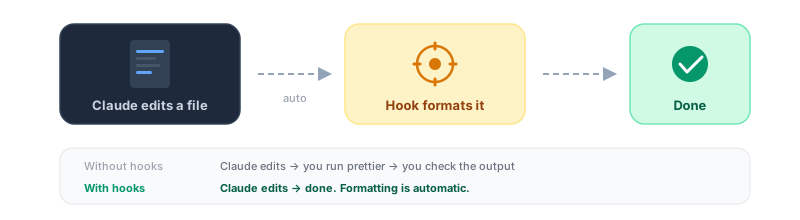
How hooks work
Hooks are defined in your .claude/settings.json file. Each hook specifies:
- When it runs (the event name)
- What it matches (a tool or action filter)
- What it does (a shell command)
Here's a simple example that runs Prettier after every file edit:
{
  "hooks": {
    "PostToolUse": [
      {
        "matcher": "Edit|Write",
        "hooks": [
          {
            "type": "command",
            "command": "jq -r '.tool_input.file_path' | xargs npx prettier --write"
          }
        ]
      }
    ]
  }
}
Every time Claude uses the Edit or Write tool, this hook runs Prettier on the changed file automatically.
Notice two things: the matcher filters which tool triggers the hook, and the command uses jq to read the file path from JSON passed on stdin — that's how hooks receive data from Claude Code.
Hook events
The most commonly used events are listed below. Claude Code supports additional events like PermissionRequest, PostToolUseFailure, SubagentStart, SubagentStop, PreCompact, and SessionEnd.
| Event | When it fires |
|---|---|
PreToolUse | Before a tool call executes — can block it |
PostToolUse | After a tool call succeeds |
SessionStart | When a session begins, resumes, clears, or context compacts |
Stop | When Claude finishes responding |
Notification | When Claude needs your attention |
UserPromptSubmit | When you submit a prompt, before Claude processes it |
Three hooks every project should have
1. Auto-format after edits
The most common hook. Catches formatting issues immediately instead of at commit time:
{
  "hooks": {
    "PostToolUse": [
      {
        "matcher": "Edit|Write",
        "hooks": [
          {
            "type": "command",
            "command": "jq -r '.tool_input.file_path' | xargs npx prettier --write"
          }
        ]
      }
    ]
  }
}
2. Block dangerous commands
Prevent Claude from running destructive commands. Exit code 2 blocks the action — any other non-zero code lets it through:
{
  "hooks": {
    "PreToolUse": [
      {
        "matcher": "Bash",
        "hooks": [
          {
            "type": "command",
            "command": "\"$CLAUDE_PROJECT_DIR\"/.claude/hooks/block-dangerous.sh"
          }
        ]
      }
    ]
  }
}
The script .claude/hooks/block-dangerous.sh:
#!/bin/bash
INPUT=$(cat)
COMMAND=$(echo "$INPUT" | jq -r '.tool_input.command')

if echo "$COMMAND" | grep -q "git push --force"; then
  echo "BLOCKED: Force push requires manual confirmation" >&2
  exit 2
fi

exit 0
Make it executable with chmod +x .claude/hooks/block-dangerous.sh.
Key detail: only exit code 2 blocks the action. Exit 0 lets it through. Any other exit code (1, 3, etc.) also lets it through — stderr is logged but doesn't stop anything.
3. Re-inject context after compaction
When Claude's context window fills up, it compacts (summarizes) the conversation. This can lose important details. Re-inject critical context automatically:
{
  "hooks": {
    "SessionStart": [
      {
        "matcher": "compact",
        "hooks": [
          {
            "type": "command",
            "command": "echo 'Reminder: use Bun, not npm. Run bun test before committing. Current sprint: auth refactor.'"
          }
        ]
      }
    ]
  }
}
Anything your hook writes to stdout during SessionStart gets added to Claude's context.
How hooks receive data
Hooks don't use environment variables for event data. Instead, Claude Code passes JSON on stdin. You parse it with jq:
#!/bin/bash
INPUT=$(cat)
FILE_PATH=$(echo "$INPUT" | jq -r '.tool_input.file_path // empty')
For a PreToolUse hook on Bash, the stdin JSON looks like:
{
  "session_id": "abc123",
  "cwd": "/Users/you/project",
  "tool_name": "Bash",
  "tool_input": {
    "command": "npm test"
  }
}
The one environment variable you will use is $CLAUDE_PROJECT_DIR — the path to your project root. Use it for referencing hook scripts:
"command": "\"$CLAUDE_PROJECT_DIR\"/.claude/hooks/my-script.sh"Hook tips
Keep hooks fast. All matching hooks for an event run in parallel, but they block Claude from continuing until they finish. A slow hook slows down everything.
Remember exit code 2. It's the only code that blocks an action. Use it intentionally in PreToolUse hooks for safety gates. Everything else lets the action through.
Don't overdo it. One or two hooks per event is ideal. Too many hooks slow down the workflow and create confusing error chains.
How hooks fit with agents and skills
Hooks, agents, and skills work together:
- Agents define who does the work (persona, tools, rules)
- Skills define what workflow to follow (steps, triggers)
- Hooks enforce quality automatically (formatting, logging, safety gates)
A developer agent runs a skill that edits code. The hook catches formatting issues before they pile up. Each layer has a clear job.
Next steps
- Try pre-built hooks: The Enterprise Dev Team template includes production hooks for formatting and orchestration logging
- Learn multi-agent: See how agents work together to handle complex tasks
- Start free: The Startup Dev Team is free and includes agents, skills, and a full orchestration guide